Pinkfong Tracing World : ABC
- 3.9
- Rating
- 1.00M
- Installs
- Free
- Price
 Analysis by App-foxy
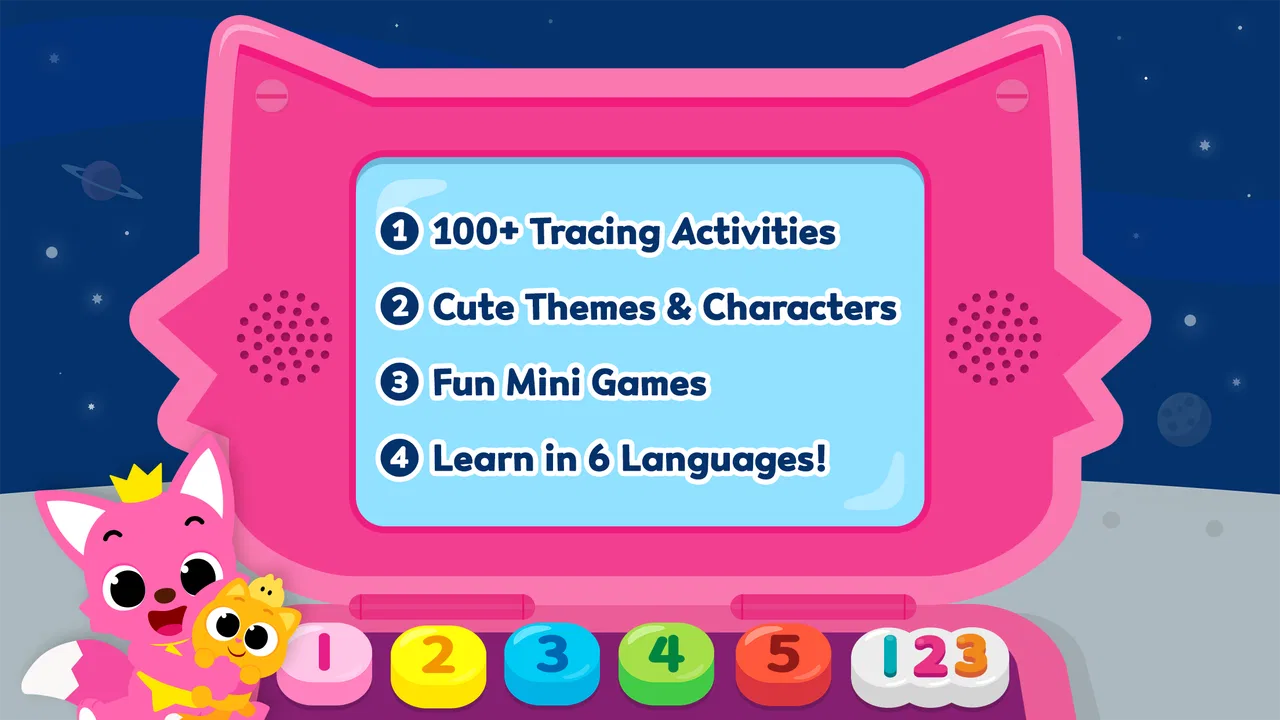
Learning letters and numbers can become tiring when practice feels like a worksheet repeated on a screen. I found Pinkfong Tracing World: ABC more inviting because it turns early handwriting practice into a collection of short tracing activities with a clear purpose: helping young children become familiar with the alphabet and basic numbers. It is a free educational game from The Pinkfong Company, aimed at everyone, although its design is most clearly suited to children who are beginning to recognize and draw simple characters.
My first impression was that this is less about winning and more about building a comfortable routine. The child is asked to follow paths, pay attention to shapes, and repeat movements. That makes it a useful choice for a parent who wants a gentle introduction to tracing rather than a demanding game full of timers, complicated rules, or competitive pressure. The bright presentation gives the activity more energy than a plain handwriting exercise, while the basic task remains easy to understand.
How the first goals make tracing feel like play
The early goal is immediately understandable: follow the guide and complete the letter or number. That clarity matters for a young player. There is no need for a parent to explain a long tutorial before the child can begin, and the connection between the action on screen and the learning objective is obvious. A child can see a character, trace it, and recognize that finishing the path is the achievement.
You May Also Like

 Blood Strike: 2.5 Anniversary
Blood Strike’s Loadouts Turn Every Drop Into a Tactical Gamble
A close look at Blood Strike’s custom loadouts: how fast access to signature weapons reshapes its battle royale rhythm, rewards preparation, and narrows the gap between fights.

 Pandora - Music & Podcasts
Pandora’s Music Is Easy to Start, but Harder to Recover
Pandora’s strength is its low-effort path from a seed to a station. Its weak spot is how much confidence it asks you to place in connection, setup, and quiet recovery.

 8 Ball Pool
 Is Built on Rivalries, Rematches, and Routine
A close look at the rivalries, rematches, shared routines, and unanswered safety questions that turn a quick pool match into a persistent mobile community.

 Samsung Music
’s Quiet Strength Is Playing What You Already Own
Its reach comes less from spectacle than from dependable access to a personal library. That simplicity is both the app’s strongest retention engine and its ceiling.

 AccuWeather: Weather Radar
AccuWeather Review: A Quick, Clear Forecast for Everyday Decisions
For everyday plans, the best forecast is the one you can understand quickly. AccuWeather makes rain timing, radar, and local conditions easy to act on, with a few trade-offs.

 Hill Climb Racing
Why Hill Climb Racing Still Turns Crashes Into One More Run
A tiny car, a bumpy hill and one more upgrade: Hill Climb Racing keeps resurfacing because its simple chaos makes every near-miss feel personal.
More From Our News Desk



I like this approach because it creates small, reachable targets. Instead of asking a beginner to write a whole word, the game focuses attention on one shape at a time. That reduces the intimidation that often comes with handwriting practice. It also gives parents a practical way to introduce short sessions: one or two tracing activities can be enough for a quick learning moment before breakfast, after school, or during a quiet break.
The alphabet focus makes the game especially suitable for children who are still connecting letter names, visual forms, and hand movement. Number tracing adds a useful second direction, so the experience is not limited to letters alone. A child who enjoys counting activities may respond well to the number side, while another may prefer returning to familiar alphabet shapes. The two areas support the same basic skill without requiring the child to switch to an entirely different type of game.
There is also a helpful difference between recognizing a letter and physically tracing it. Many early-learning apps stop at tapping the correct answer, but tracing asks the child to slow down and control a finger or stylus. That does not replace paper practice, yet it can serve as a low-pressure bridge toward it. I would use the game to introduce shapes and reinforce familiarity, then occasionally follow it with real pencil work so the child learns that the movement applies outside the screen too.
A useful parent-led routine is to avoid treating every session as a test. I would first let the child trace freely, then ask which letter or number appeared, and finally point out where that same character can be found in an everyday setting, such as on a book cover or a house number. This turns the activity into a short conversation rather than isolated screen time. The app supplies the visual practice, while the adult supplies the context.
What progress feels like during ordinary play
The strongest progress signal is completion itself. Finishing a tracing path gives the child a visible sense that the task has been handled, even when the activity is simple. For a beginner, that immediate feedback can be more motivating than a distant reward. The child does not have to wait through a long lesson to feel successful; each completed character can act as a small checkpoint.
That structure is valuable for children with short attention spans. A parent can watch for signs that the child is still engaged and stop before frustration grows. Because the activities are built around individual characters, it is easier to create a natural stopping point than in a long story or level that demands a substantial time commitment. This makes the game practical for brief practice rather than only for extended play.
At the same time, parents should understand what kind of progress the game can and cannot show. Completing a digital path does not automatically mean the child can form the character independently on paper. The screen guides movement, while handwriting requires memory, pressure control, spacing, and coordination with a pencil. I see the app as a confidence-building step, not a complete handwriting curriculum.
One of the more useful ways to judge improvement is to watch behavior rather than chase a score. Is the child starting the path with less hesitation? Are they looking at the shape before moving? Do they keep their finger closer to the guide? Those observations reveal learning more reliably than simply counting completed activities. They also help a parent decide when to move from guided digital tracing to a blank sheet of paper.
The game’s educational category is therefore a good fit, but its value depends on how it is used. If a child is left to tap quickly without noticing the form of each character, the learning benefit may be shallow. I would encourage slow movements and occasional verbal prompts, such as asking where the line begins or whether the character has a curve. That small amount of adult involvement makes the activity more deliberate without turning it into a formal lesson.
A gentle difficulty curve, with limits for advanced learners
The basic tracing concept is accessible because the child is not expected to invent each character from memory at the start. Following a visible path gives beginners a clear physical target. This is especially helpful for children who know some letters but lack the coordination to reproduce them confidently. The activity lets them practice the motion while still receiving guidance.
However, the challenge is naturally limited by the simplicity of tracing. Once a child has become comfortable following paths, the same activity may no longer feel demanding. That is not a flaw for its intended audience, but it does affect how long the game can remain engaging for a child already writing letters independently. In that situation, a paper workbook, free-writing exercise, or a more advanced handwriting tool may offer a better next step.
I would also avoid assuming that every child will find the same characters equally easy. Straight lines may feel manageable, while curves, crossings, or combinations of movements can require more control. A child who rushes through familiar shapes may still need patient practice with the less comfortable ones. The best approach is to let the child repeat a difficult character without framing it as failure.
The pacing works best when the adult keeps expectations modest. This is not a game I would choose for a child who wants increasingly complex puzzles, fast reactions, or a strong sense of competition. Its challenge comes from attention and hand control, not from strategic decisions. That makes it calmer than many children’s games, but also less exciting for players who need constant novelty.
There is a useful trade-off here. The straightforward design lowers the barrier to entry, yet the same simplicity limits the depth of mastery. For preschool practice or a first introduction to tracing, that balance is sensible. For a child who already writes the alphabet comfortably, the game may work better as occasional review than as a main activity.
How the presentation supports attention without replacing learning
The Pinkfong identity gives the game a child-friendly tone, and the playful framing helps tracing feel less like correction work. That matters because children often resist tasks they associate with mistakes. A cheerful activity can make it easier to invite them back, particularly when the parent presents it as a short game rather than mandatory study.
Still, presentation should remain a tool rather than the main attraction. I would pay attention to whether the child is watching the character and following the path or simply reacting to visual stimulation. If the excitement becomes more important than the shape being practiced, a quieter session may be more productive. The app is most effective when its colorful appeal leads into careful movement instead of replacing it.
For families sharing a device, the touch interaction is convenient, but it also creates a practical consideration: a child may use a whole hand, tap quickly, or drag without a consistent grip. I would sit nearby during the first sessions and demonstrate a slow, controlled movement. If the device supports a stylus that the child already knows how to hold, that may make the transition toward pencil control more meaningful, though the digital movement should still be followed by offline practice.
Free access, optional spending, and the real retention pressure
The game is free to download, which makes it easy to try before deciding whether it fits a child’s learning style. There are in-app purchases ranging from $2.99 to $109.99 per item, so parents should review the purchase setup before handing over the device. The wide range means the free starting point should not be confused with an entirely cost-free experience, especially in a household where children can reach purchase controls.
I would approach the game’s retention in a measured way. Short tracing goals can encourage a child to return because the task is familiar and the effort required is small. That is a positive form of repetition when the child is still developing recognition and control. But repeated play should not become the only measure of success. A child may enjoy returning to favorite characters without making equal progress across all letters or numbers.
My practical recommendation is to set a simple boundary before play begins: complete a small amount of tracing, talk about one or two characters, and then move to another activity. This prevents the game from becoming an endless loop while preserving its value as a practice tool. It also helps parents judge whether the child is returning because of genuine learning interest or merely because the presentation is entertaining.
The purchase question is particularly important for families looking for a fully open educational resource. If your priority is avoiding all optional spending, you may prefer a paper workbook or a completely free learning tool. If you are comfortable trying the free version and deciding later, the low entry barrier is useful. I would not pay simply because a child asks for more content in the moment; I would first check whether the existing tracing activities are being used thoughtfully.
The game has been available since November 25, 2015, and its current version is 33.24. It supports devices running Android 5.0 or later. Those details make it approachable for families using an older compatible device, but I would still check that the screen is large enough for a child to trace comfortably. A very small phone can make precise movement harder, even when the software itself runs properly.
Where it fits beside paper, videos, and other learning games
Compared with a paper alphabet workbook, the game offers more immediate visual response and a more playful invitation to begin. Paper remains better for learning pencil pressure, page layout, and writing without a guide. I would use the two together rather than treating them as competitors: digital tracing for introduction and repetition, paper for transferring that skill into real handwriting.
Compared with alphabet videos, this game asks the child to participate physically. A video can be useful for songs, pronunciation, or passive exposure, but it does not require the same hand movement. On the other hand, a video may hold the attention of a child who is not ready to control a tracing path. The better choice depends on whether the immediate goal is listening and recognition or active pre-writing practice.
Compared with broader educational games, this one is narrower and therefore easier to understand. It does not need a child to navigate several unrelated subjects before reaching the intended activity. That focus is a strength for a parent who wants alphabet and number tracing specifically. It is a weakness for families seeking reading comprehension, arithmetic practice, open-ended creativity, or a complete early-learning package in one app.
I would also choose a different option when a child needs detailed feedback on letter formation. A guided tracing game can show the route, but serious handwriting difficulties may require an educator or occupational professional who can observe posture, grip, pressure, and movement directly. The app can support practice, but it should not be treated as an assessment tool.
Who will benefit most from the progression
The best match is a young beginner who enjoys colorful digital activities and is ready to connect symbols with hand movement. It is also useful for parents who need a short, repeatable activity that can fit into a busy day. A child who becomes discouraged by blank paper may find the on-screen guide reassuring, while a child who already writes confidently may use it only for light review.
I would skip it as a primary choice if the child dislikes tracing, needs advanced challenges, or becomes more focused on unlocking or repeating activities than on observing the characters. I would also look elsewhere if you want a single app to cover a broad school-readiness program. Its focused nature is exactly what makes it approachable, but that focus means it cannot replace every other kind of learning practice.
The public response suggests that it has reached a substantial audience, with over one million installs and a 4.0 average from around 4.4 thousand ratings. Those figures indicate that many families have tried it, but they should not decide the purchase on their own. A popular children’s app can still be a poor fit for a particular child’s motor skills, attention span, or tolerance for repetition.
In my experience, the most effective workflow is short and intentional: let the child choose a letter or number, encourage a slow trace, ask them to identify the character, and then find a real-world example afterward. Once the child is comfortable, switch to paper and ask for the same shape without the digital guide. That sequence turns a simple screen activity into a more complete learning loop.
My verdict on goals, challenge, and staying power
Pinkfong Tracing World: ABC succeeds because its early goal is concrete, its progress is easy for a child to understand, and its pacing suits brief practice. The game does not need complicated systems to make a beginner feel involved. Tracing one character at a time gives the child a manageable sense of accomplishment, while the alphabet and number focus keeps the purpose clear.
Its main limitation is that the progression is not deep enough for children who have already moved beyond guided tracing. The challenge can become familiar, and the app works best when a parent connects it to paper writing, conversation, and real objects. Optional purchases also deserve adult attention, particularly when a child uses a shared device.
Overall, I would recommend it as a friendly starting point for digital pre-writing practice, not as a complete replacement for handwriting instruction. The free entry point makes it reasonable to try, and the Everyone rating suits its broad family audience. If your child is just beginning to explore letters and numbers, the game can make those first steps feel approachable. If your child needs advanced writing challenges or a wider curriculum, another tool will eventually be the better choice.
FAQs for Pinkfong Tracing World : ABC
01What is Pinkfong Tracing World: ABC designed for?
Pinkfong Tracing World: ABC is an educational app designed to help young children learn the alphabet through interactive tracing activities. The app uses engaging animations, fun sounds, and colorful graphics to capture children's attention and make learning enjoyable. It provides a playful environment for kids to develop their handwriting skills while also reinforcing letter recognition and phonics.
02Is Pinkfong Tracing World: ABC suitable for all ages?
Pinkfong Tracing World: ABC is primarily targeted at preschoolers and kindergarten-aged children, typically between 3 to 6 years old. The app’s simple interface and engaging content make it appropriate for young learners. Parents should supervise and guide their children to maximize the educational benefits and ensure the app's content aligns with their learning stage.
03Does Pinkfong Tracing World: ABC require an internet connection?
Pinkfong Tracing World: ABC can be used offline once the initial download and installation are complete. This allows children to continue learning and playing without needing a constant internet connection, making it ideal for use during travel or in areas with limited connectivity. However, some features or updates may require an internet connection.
04Are there in-app purchases or advertisements in Pinkfong Tracing World: ABC?
While Pinkfong Tracing World: ABC is free to download, it may contain in-app purchases that unlock additional content or features. The app might also include advertisements, which can be removed by purchasing a premium version. Parents should review the in-app purchase options and set appropriate controls to manage their child's access to extra content.
05How does Pinkfong Tracing World: ABC support different learning styles?
Pinkfong Tracing World: ABC supports various learning styles by combining visual, auditory, and kinesthetic elements. The app provides animated demonstrations for visual learners, catchy songs and sounds for auditory learners, and interactive tracing activities for kinesthetic learners. This multi-sensory approach helps cater to different preferences, ensuring a comprehensive learning experience.
Pros
- Engaging animations for kids.
- Easy-to-navigate interface.
- Educational and fun activities.
- Colorful and appealing visuals.
- No ads during gameplay.
Cons
- Limited free content.
- In-app purchases can add up.
- Requires internet for updates.
- Might be too simple for older kids.
- Some features need a subscription.

Pinkfong Tracing World : ABC
Gallery